I Got Tired of Manually Shutting Down My Lab When the Power Goes Out
Living in a place with frequent power outages means my home lab gets an unexpected stress test a few times a year. The UPS kicks in, everything keeps running for a while, and if I’m home, I can gracefully shut things down. But if I’m out — groceries, work, travel — the UPS eventually drains, and the VMs crash uncleanly. Corrupted VMDK files, inconsistent databases, the kind of Tuesday I’d rather not have.
I have an APC UPS with an AP9631 network management card. That card speaks SNMP. And I thought: this thing already tells me exactly what’s going on — power status, battery charge, runtime remaining. So why not make it do the work for me?
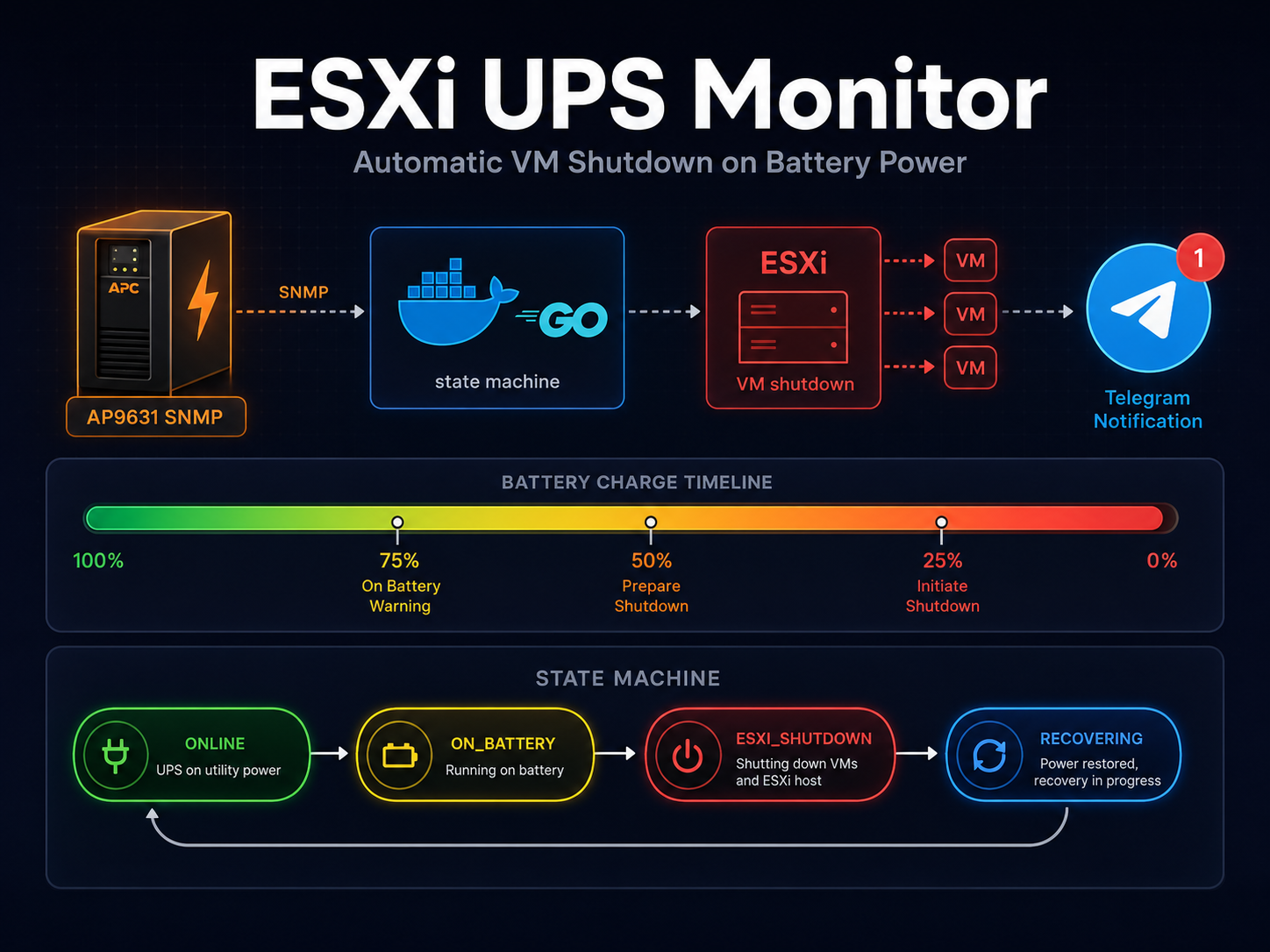
The result is esxi-ups-monitor: a Go application that polls the UPS via SNMP, tracks battery state, shuts down ESXi VMs in stages as the battery drains, and starts them back up when power returns. It runs in a Docker container, sends Telegram notifications at every step, and has been handling my lab for a while now without any drama.
The Hardware
The AP9631 is APC’s network management card, commonly installed in Smart-UPS models. It exposes a full SNMP MIB with everything you’d want: output status (online vs. on battery), battery charge percentage, estimated runtime remaining, output load, and more.
I poll five OIDs in a single SNMP GET request:
| OID | What it gives you |
|---|---|
.1.3.6.1.4.1.318.1.1.1.4.1.1.0 |
Output status: 2 = online, 3 = on battery |
.1.3.6.1.4.1.318.1.1.1.2.2.1.0 |
Battery charge, 0–100% |
.1.3.6.1.4.1.318.1.1.1.2.2.3.0 |
Runtime remaining (TimeTicks — divide by 100 for seconds) |
.1.3.6.1.4.1.318.1.1.1.2.1.1.0 |
Battery status |
.1.3.6.1.4.1.318.1.1.1.4.2.3.0 |
Output load percentage |
The one-liner to test connectivity:
snmpwalk -v2c -c public 192.168.1.100 .1.3.6.1.4.1.318.1.1.1.2.1.1.0If you get a number back, you’re good. If not, check your network config.
Why Go, Why SNMP, Why SSH
Why Go? Because I wanted a single binary that I could throw into a Docker image and forget about. Go is fine for this: the standard library covers SSH, and gosnmp handles the SNMP side. The output is a ~15MB static binary running inside Alpine. No interpreter, no runtime dependencies.
Why SNMP over the web interface? The AP9631 has a web UI you can scrape, but SNMP is more reliable and less intrusive. One UDP packet, one response, done. No parsing HTML, no session management, no dealing with login pages. SNMP is the right tool for this job.
Why SSH into ESXi directly instead of using vCenter? I don’t run vCenter. It’s a single ESXi host in my lab. Even if I did, the vCenter API is heavy overkill for shutting down VMs. SSH gives me direct access to esxcli vm process kill --type=soft and esxcli system shutdown poweroff. The app generates an SSH key on first run and logs the public key, so setup takes about 30 seconds.
How It Works
The core is a state machine with four states: ONLINE, ON_BATTERY, RECOVERING, and ESXI_SHUTDOWN. Every 10 seconds it polls the UPS, feeds the status into the state machine, and acts on whatever comes out.
ONLINE → ON_BATTERY
When the UPS reports output status 3 (on battery), we transition from ONLINE to ON_BATTERY. A timer starts. A Telegram message fires with current battery status.
ON_BATTERY: Stage Execution
You define stages in config.yaml, each with an after_seconds and/or runtime_remaining_seconds. Either condition triggers — whichever comes first. Example config:
stages:
  - after_seconds: 300
    runtime_remaining_seconds: 900
    vms:
      - plex
      - forgejo-runner
      - test-server

  - after_seconds: 600
    runtime_remaining_seconds: 600
    vms:
      - grafana
      - influxdb
      - homeassistant

  - after_seconds: 900
    runtime_remaining_seconds: 420
    vms:
      - docker-prod
The Final Stage
When battery is running low — the final stage kicks in. It shuts down the final VMs (including the monitor itself) and sends an ESXi shutdown command with a delay.
final:
  after_seconds: 1200
  runtime_remaining_seconds: 300
  delay_seconds: 90
  vms:
    - esxi-ups-monitor
The delay gives the container time to shut down cleanly before ESXi issues shutdown.
RECOVERING: Power Returns
When the UPS reports online again, we enter RECOVERING. Recovery waits until the battery has enough charge and runtime:
recovery:
  startup_delay_seconds: 120
  startup_runtime_remaining_seconds: 1800
ESXI_SHUTDOWN: The Sleep State
Once ESXi is powered off, the monitor sits in ESXI_SHUTDOWN, waiting for power to return.
Here’s the state machine visually:
The Recovery Pattern
LIFO (last-in-first-out) startup. VMs shut down in order, and start in reverse. The last VM shut down is the first one started. This means core infrastructure comes back last, after the power is stable.
Here’s the architecture overview:
Why Not Just Use NUT?
NUT (Network UPS Tools) is a solid project. But the staged shutdown with runtime-awareness was the main gap. NUT can run scripts on power events, but building per-stage thresholds with OR logic requires a custom script anyway. The Telegram integration, LIFO recovery, and graceful ESXi host shutdown with delay are all custom logic on top of raw UPS data. The monitor replaces the script I would have written on top of NUT, with SNMP polling built in.
Deployment
The setup takes about five minutes. Clone the repo, edit config.yaml, and run docker-compose up -d. On first run, the container generates an SSH key and prints the public key to the logs. Copy that key into ESXi authorized keys. Restart the container.
docker-compose up -d
docker-compose logs | grep "Public key"
# Paste into ESXi authorized keys
docker-compose restart
The docker-compose.yml mounts config read-only and creates ./secrets for the SSH key. Telegram env vars via .env. Cross-compiled binaries available for linux-amd64, arm64, armv7, and armv6 on the releases page.
Gotchas I Hit Along the Way
The container is one of the VMs it manages. The solution is the delay in the final stage: the monitor shuts itself down, then ESXi gets a delayed shutdown command. The delay gives the container time to finish — sending the last Telegram notification, closing connections.
SNMP TimeTicks are in hundredths of a second. The APC MIB returns runtime remaining as TimeTicks (1/100th sec). 30000 TimeTicks = 300 seconds = 5 minutes. The code divides by 100.
SSH host key validation. Using ssh.InsecureIgnoreHostKey() is reasonable for a home lab where the host key changes on ESXi reinstall.
ESXi finds VMs by world ID, not name. The ListVMs() function parses esxcli vm process list output to find world IDs matching VM names.
Here’s the sequence flow:
The Code
The project is written in Go, hosted on repo.noop.re/drops/esxi-apc. MIT licensed. Pull requests welcome.
If you have a similar setup — APC UPS with SNMP, ESXi host, a few VMs — clone it, tweak the config, and let me know if it works for you. Or if it breaks. Both are useful feedback.
