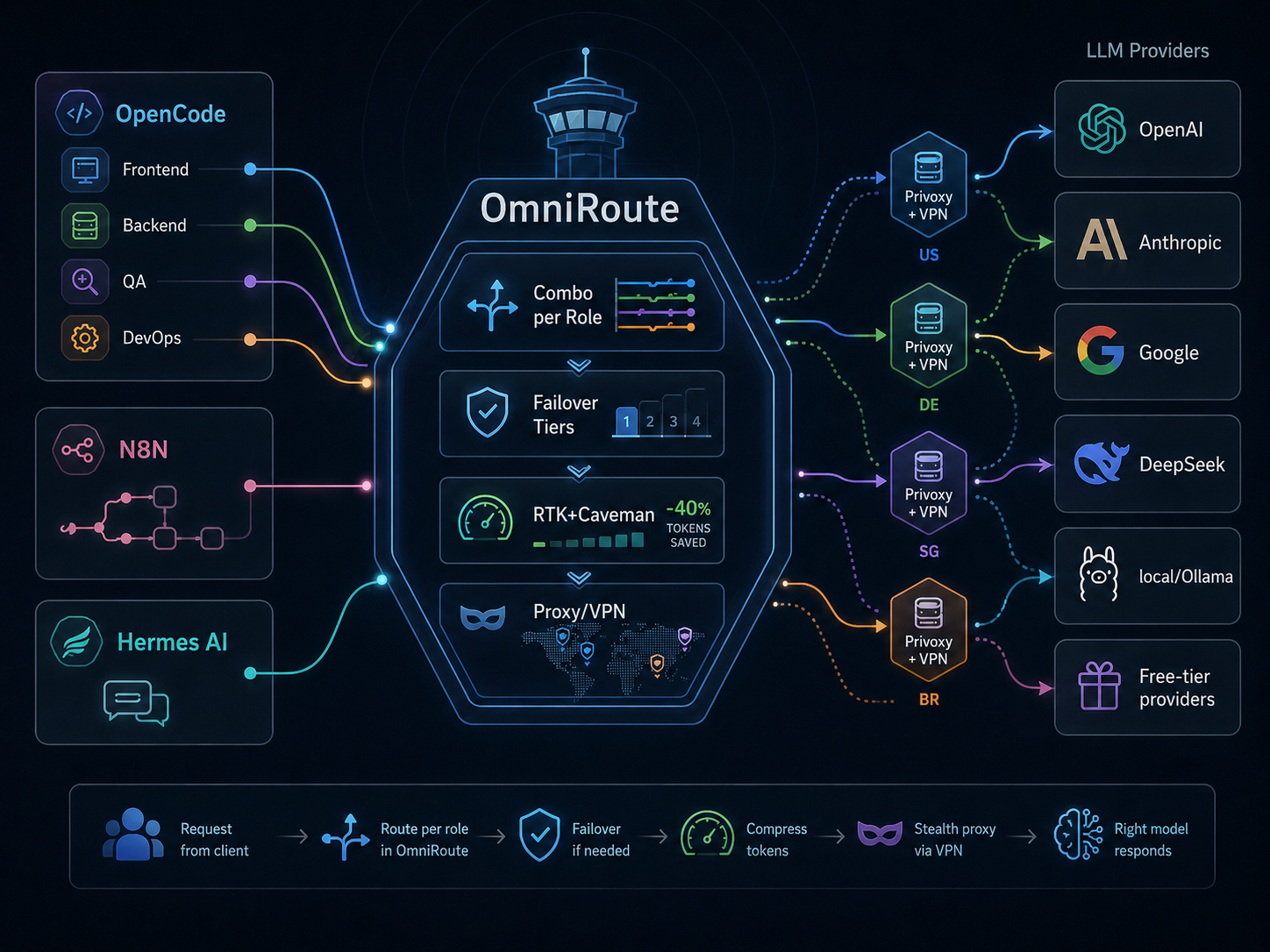
With a single coding agent, a model router is not particularly necessary. An API key, an endpoint, and you are done. The problem begins when there are several agents and tools using models, each with different requirements and limitations. In my setup, OmniRoute handles traffic from OpenCode, N8N automations, and Hermes AI. One address, one port, and behind it a configuration that decides which provider and which model to use. That is why I decided to describe how it looks in daily operation.
What Is OmniRoute
OmniRoute is a local AI gateway that exposes a single OpenAI-compatible endpoint (localhost:20128/v1). Clients do not need to know which provider they are actually using. The router accepts a request, decides on the route based on configured rules, and forwards it to one of over 330 providers. The project is open source (MIT license), maintained by a community around a GitHub repository that has collected over 53,000 stars.
It can be run via npm, as a Docker container, or as an Electron desktop application. In my case, it is Docker.
A Single Access Point Instead of Multiple Keys
Before OmniRoute, every tool had to have API keys pasted for specific providers. Switching the backend from OpenAI to Anthropic or Google meant reconfiguring each client separately. Now, the keys are stored in one place, and clients only know the router address and their authentication token.
Switching from one provider to another does not require touching configuration on the tools side. Adding a new agent to the environment comes down to pointing it at the router endpoint and generating a key in the dashboard.
Combo Per Role
The most useful mechanism in my configuration is combos assigned to roles. In OpenCode, I work with several specialized profiles: Frontend Engineer, Backend Engineer, Research Engineer, QA Engineer, Write Engineer, Blogger, Reviewer, and DevOps. Each of these profiles has its own set of models tailored to the specifics of its tasks.
The agent responsible for infrastructure gets a model that handles shell scripts, configuration files, and system logs well. The research role uses a model with a large context window. Content writing goes to a model that handles longer text forms better. There is no single perfect model for everything, but you can match the right one to a specific need.
Failover and Resilience
OmniRoute supports 4-tier failover. Priority goes to subscriptions (if you have one), then API keys for paid providers, followed by cheaper alternatives, and finally providers with free quotas. If the provider at the first position returns an error or exhausts its limit, the router switches to the next one automatically. Switching time is measured in milliseconds.
An additional layer is the circuit breaker: if a given provider starts failing regularly, OmniRoute stops routing traffic to it for a while, then cautiously checks whether the situation has improved. In practice, this means agents do not stop mid-task because one of the providers is having temporary issues.
Token Compression
OmniRoute has two compression mechanisms that can be stacked. RTK (Real-Time Kompression) reduces repetitive tokens in the context window. Caveman goes further and aggressively shortens tool output data such as diffs, logs, or grep results. Combining both yields 15–95% savings according to the documentation, with an average of around 89% on tool-heavy sessions.
This is not just a technical curiosity. It directly impacts how many queries fit within a free quota and how quickly a paid account gets depleted.
Proxy Routing
One of the less obvious but useful features is proxy server support. In my configuration, I have set up several Privoxy instances connected to VPN tunnels in different geographic locations. Selected accounts in OmniRoute route traffic through these proxies. This comes in handy when a provider blocks traffic from a specific region or when I want to distribute query sources across different IP addresses.
What to Watch Out for in Daily Operation
The official Docker image (diegosouzapw/omniroute:latest) can fall behind changes in the source code. If you need an immediate fix or support for a new provider, it is sometimes faster to build the image locally from the repository than to wait for the tag to update.
The second issue is the web dashboard and built-in health checks. It happens that test queries in the OmniRoute interface signal errors for specific providers or models, even though agent traffic through configured combos passes without any issues. Initially, it looks like a configuration problem, but it quickly turns out that the dashboard diagnostics simply do not fully reflect the state that an agent sees when using defined routing rules. It is not worth spending time debugging solely based on red indicators from the test panel.
Summary
OmniRoute works well as a central AI gateway in an environment with multiple agents and tools. A single address is enough for all LLM traffic to pass through controlled and configurable rules. Combo per role, automatic failover, token compression, and proxy support provide a solid foundation for daily work without manually monitoring the status of individual providers.
If you run more than one agent or an automation that uses models, a router like this quickly stops being an add-on and becomes an actual part of the infrastructure.
